
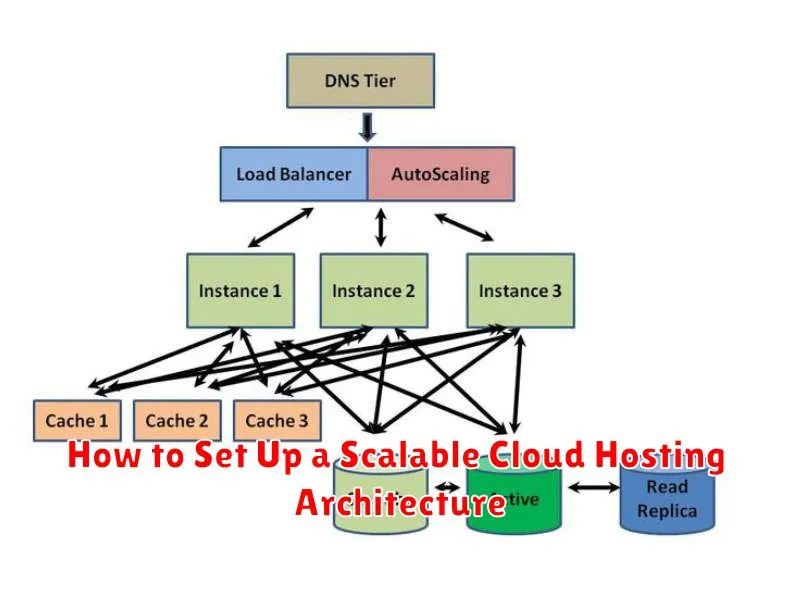
In today’s dynamic digital landscape, scalability is no longer a luxury but a necessity for businesses of all sizes. A scalable cloud hosting architecture allows your infrastructure to adapt to fluctuating demands, ensuring optimal performance and cost-efficiency. Whether you’re experiencing a sudden surge in traffic or planning for long-term growth, understanding the principles of scalable cloud hosting is crucial for sustained success. This article will provide a comprehensive guide on how to set up a robust and scalable cloud hosting architecture, covering key considerations, best practices, and essential tools.
Building a scalable cloud hosting architecture involves careful planning and execution. From choosing the right cloud provider and service model to implementing effective scaling strategies, each decision impacts the overall performance, reliability, and cost of your infrastructure. We will delve into the core components of a scalable architecture, including load balancing, auto-scaling, and database optimization. By the end of this article, you will be equipped with the knowledge and resources necessary to design and implement a cloud hosting architecture that can seamlessly adapt to the evolving needs of your business.
Understand Your Website’s Traffic Needs
Before designing a scalable cloud hosting architecture, it’s crucial to understand your website’s traffic needs. Accurately estimating current and future traffic helps determine the necessary resources.
Analyze historical data, if available, to identify peak traffic times and average visitor numbers. Consider factors like seasonal trends and marketing campaigns that may influence traffic fluctuations.
Projecting future traffic involves understanding your business growth goals. Overestimating resources can lead to unnecessary costs, while underestimating can hinder performance and scalability during traffic spikes.
Design for Horizontal Scaling
Horizontal scaling is a critical aspect of a scalable cloud architecture. It involves adding or removing servers to your application tier based on demand. This approach allows your system to handle traffic spikes effectively without impacting performance. Consider using stateless applications to facilitate horizontal scaling. Stateless applications do not store user-specific data on individual servers. This allows you to easily distribute incoming requests across multiple server instances.
Load balancing plays a key role in distributing traffic efficiently across the available servers. By distributing the workload, no single server becomes overwhelmed, ensuring consistent application responsiveness even under heavy load. Cloud providers offer managed load balancing services that simplify implementation and automate scaling.
Utilize Load Balancers
Load balancers are a critical component of a scalable cloud architecture. They distribute incoming network traffic across multiple servers, preventing any single server from becoming overloaded. This ensures high availability and fault tolerance. If one server fails, the load balancer automatically redirects traffic to the remaining healthy servers.
There are different types of load balancing algorithms, such as round-robin, least connections, and IP hash. Choosing the right algorithm depends on the specific application requirements. Properly configured load balancers are essential for handling traffic spikes and ensuring consistent application performance.
Implement Auto-Scaling Mechanisms

Auto-scaling is crucial for a scalable cloud architecture. It dynamically adjusts computing resources to meet fluctuating demand. This ensures optimal performance and cost-efficiency.
Configure auto-scaling policies based on key metrics like CPU utilization, memory usage, and request latency. Set thresholds that trigger scaling actions, such as adding or removing virtual machines.
Consider the cool-down period to prevent rapid scaling actions. This period allows the system to stabilize after a scaling event before further adjustments are made.
Use Microservices for Flexibility
Microservices architecture offers significant advantages for scalability and flexibility. Instead of a single monolithic application, the system is broken down into smaller, independent services.
Each microservice focuses on a specific business function and communicates with other services via APIs. This allows for independent deployment, scaling, and updates. If one service requires an update or experiences increased load, only that specific service needs attention, leaving the rest of the system unaffected.
This modular approach also simplifies development and maintenance, allowing teams to work on individual services concurrently. Furthermore, it allows for greater flexibility in technology choices, as each microservice can be built using the most appropriate language and framework.
Choose Elastic Storage Solutions
Scalable cloud architectures require storage solutions that can adapt to changing demands. Elastic storage offers the flexibility to increase or decrease capacity as needed, optimizing costs and performance. Choosing the right elastic storage depends on your specific workload.
Consider factors like performance requirements, frequency of access, and data durability. For high-performance applications, consider SSD-backed block storage. If cost-effectiveness is paramount and performance is less critical, object storage might be more suitable for large datasets or archives.
Cloud providers offer various managed elastic storage services. Evaluate these options based on your specific needs and integrate them into your architecture to achieve a truly scalable solution.
Monitor with Cloud Analytics Tools
Monitoring your cloud hosting architecture is crucial for maintaining performance, availability, and security. Leverage your cloud provider’s analytics tools to gain insights into resource utilization, application performance, and potential bottlenecks.
These tools provide real-time dashboards and reporting capabilities, enabling you to identify trends, anomalies, and areas for optimization. Set up alerts to proactively address performance degradation or security threats. Track key metrics such as CPU usage, memory consumption, network traffic, and disk I/O to ensure optimal resource allocation and identify potential scaling needs.
Distribute Traffic Across Regions
Distributing traffic across multiple regions is a key aspect of building a scalable and resilient cloud hosting architecture. This approach minimizes latency for end-users and ensures high availability in case of regional outages. By serving content from a location closer to the user, you improve performance and provide a better user experience.
Several methods facilitate traffic distribution. DNS load balancing directs traffic based on geographic location. Geo-routing capabilities within cloud providers allow you to route traffic based on user origin. Content Delivery Networks (CDNs) cache content closer to users, reducing the load on origin servers and improving delivery speed. Choosing the right approach depends on your specific needs and budget.
Ensure Database Scalability
Database scalability is crucial for handling increasing data loads and user traffic. Choosing the right database solution and implementing appropriate scaling techniques will prevent performance bottlenecks as your application grows. Consider cloud-native database services that offer automated scaling and high availability. These services typically handle replication, sharding, and backups, minimizing administrative overhead.
Evaluate different database types, such as relational (SQL) and NoSQL, based on your application’s needs. SQL databases offer strong consistency and are suitable for transactional workloads. NoSQL databases provide flexibility and scalability for large datasets and high-velocity read/write operations. Optimize database queries and schema design for performance. Implement caching strategies to reduce database load.
Test for Failover and Redundancy

Testing failover mechanisms is critical. Simulate failures to ensure redundancy systems activate as expected. This involves disrupting services in a controlled environment to observe the system’s response.
Focus on recovery time objective (RTO) and recovery point objective (RPO). Measure how long it takes for services to restore and how much data loss is acceptable. Document these metrics and refine your architecture to meet your business requirements.
Regular testing helps identify weak points and refine your failover procedures. This ensures your system can withstand real-world disruptions and maintain business continuity.
