
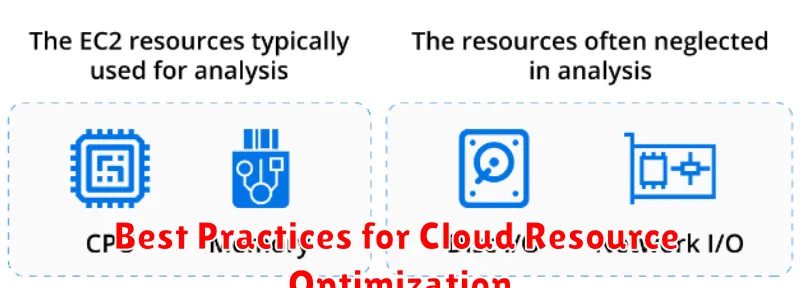
Cloud resource optimization is a critical aspect of managing cloud costs and ensuring efficient performance. In today’s dynamic cloud environment, organizations must adopt best practices to avoid overspending, maximize resource utilization, and achieve optimal return on investment. This article explores key strategies and techniques for optimizing cloud resources across various cloud platforms, helping you effectively control spending while maximizing the value of your cloud investment. From right-sizing virtual machines to leveraging reserved instances and implementing automated cost management tools, we’ll cover the essential components of a successful cloud optimization strategy. Understanding and implementing these best practices is crucial for any organization seeking to harness the full potential of the cloud while maintaining cost efficiency.
Whether you are migrating to the cloud or already operating within a cloud environment, effectively managing and optimizing your cloud resources is paramount. This article provides actionable insights and best practices to guide you through the process of cloud resource optimization. We’ll delve into the specifics of cost optimization, performance enhancement, and resource allocation. By implementing these best practices, you can significantly reduce cloud spending, improve application performance, and ensure that your cloud infrastructure is aligned with your business objectives. Join us as we explore the key strategies for achieving sustainable cloud resource optimization and maximizing the value of your cloud deployments.
Monitor Usage Continuously
Continuous monitoring of cloud resource utilization is crucial for effective optimization. Real-time visibility into how your resources are being consumed allows you to identify areas of waste or inefficiency promptly.
Utilize cloud provider tools or third-party monitoring solutions to track key metrics such as CPU utilization, memory usage, and network traffic. Set up alerts to notify you of unusual spikes or drops in resource consumption, enabling proactive intervention.
Regularly analyze usage patterns to understand trends and predict future needs. This data-driven approach empowers informed decisions about right-sizing resources, scheduling tasks efficiently, and optimizing overall cloud spending.
Use Auto-Scaling for Demand
One of the most powerful tools for cloud resource optimization is auto-scaling. This feature dynamically adjusts the number of computing resources allocated to your application based on real-time demand. By automatically scaling up during peak periods and scaling down during lulls, you avoid paying for unused capacity while ensuring consistent performance.
Configure auto-scaling policies based on metrics like CPU utilization, memory usage, or request latency. This allows your infrastructure to adapt to fluctuating workloads, maximizing efficiency and minimizing costs. For example, an e-commerce website can scale up the number of web servers during a flash sale and then scale down afterwards, only paying for the resources consumed during the high-traffic period.
Clean Up Idle Resources
One of the most effective ways to optimize cloud costs is to identify and eliminate idle resources. These resources, while not actively being used, still accrue costs. Regularly review your cloud environment for instances, storage volumes, and other services that are no longer needed.
Implement automated tools to monitor resource utilization. Set thresholds to trigger alerts or automated actions, such as stopping or terminating idle resources after a defined period of inactivity. This proactive approach can significantly reduce wasted cloud spend.
Consider using features like scheduling to automatically start and stop resources based on predictable usage patterns. For example, development and testing environments might only be needed during business hours. Scheduling ensures these resources are only running when required.
Choose Right-Sized Instances
Selecting appropriately sized cloud instances is crucial for cost optimization. Over-provisioning leads to wasted resources and unnecessary expense, while under-provisioning can negatively impact performance.
Analyze your application’s resource requirements, including CPU, memory, and storage. Leverage cloud provider tools, such as monitoring services, to understand usage patterns. Right-sizing involves choosing instances that meet these needs without significant excess capacity.
Consider using different instance types for different workloads. For example, compute-intensive tasks may benefit from instances with powerful CPUs, while memory-intensive applications require instances with ample RAM.
Leverage Reserved Instances
Reserved Instances (RIs) offer a significant cost-saving opportunity for consistent workloads. By committing to a one-year or three-year term, you can significantly reduce your hourly costs compared to on-demand pricing. Analyze your usage patterns to identify instances consistently running and consider purchasing RIs for those workloads.
RIs offer different payment options, allowing you to choose the upfront payment that best aligns with your budget. Standard RIs provide the highest discount, while Convertible RIs allow flexibility to change instance families or regions if your needs evolve. Scheduling options allow you to align your reserved capacity with your operational schedule for even greater savings.
Use Storage Lifecycle Policies
Storage lifecycle policies are a crucial aspect of cloud resource optimization. They automate the transition of your data between different storage classes (e.g., hot, cold, archive) based on predefined rules.
This allows you to minimize storage costs by moving less frequently accessed data to cheaper storage tiers. For example, you might move data to colder storage after 30 days of inactivity and then to archive storage after 90 days.
By implementing lifecycle policies, you ensure that your data is stored in the most cost-effective manner while maintaining accessibility based on your business needs. Regularly review and adjust your policies to reflect changing data access patterns.
Review Performance Regularly
Regular performance reviews are crucial for maintaining optimized cloud resource utilization. Consistent monitoring allows you to identify trends, bottlenecks, and areas for improvement.
Establish a defined review cadence, whether weekly, bi-weekly, or monthly. This structured approach ensures consistent evaluation and proactive adjustments.
During these reviews, analyze key performance indicators (KPIs) such as CPU utilization, memory usage, and network traffic. This data-driven approach helps pinpoint underutilized resources and potential over-provisioning.
Cost Allocation and Budgeting Tools
Cost allocation is crucial for understanding cloud spending by departments, projects, or specific resources. Tagging enables granular tracking and analysis of expenses. By tagging resources appropriately, organizations gain visibility into where their cloud budget is being allocated.
Budgeting tools provide the ability to set spending limits and receive alerts when those limits are approached or exceeded. These tools can proactively prevent overspending and facilitate better cost control. Utilizing budgeting alongside cost allocation enables informed decision-making regarding resource utilization and optimization efforts.
Apply Load Balancers Smartly
Load balancers are crucial for distributing traffic efficiently across multiple servers. Proper implementation prevents bottlenecks and ensures application availability. Consider the type of load balancer needed. Application load balancers offer advanced features like content-based routing, while network load balancers are better suited for basic TCP/UDP traffic.
Right-sizing is key. An oversized load balancer wastes resources, while an undersized one can’t handle peak loads. Analyze traffic patterns to determine the appropriate capacity. Regularly monitor performance metrics and adjust as needed.
Review and Optimize Monthly
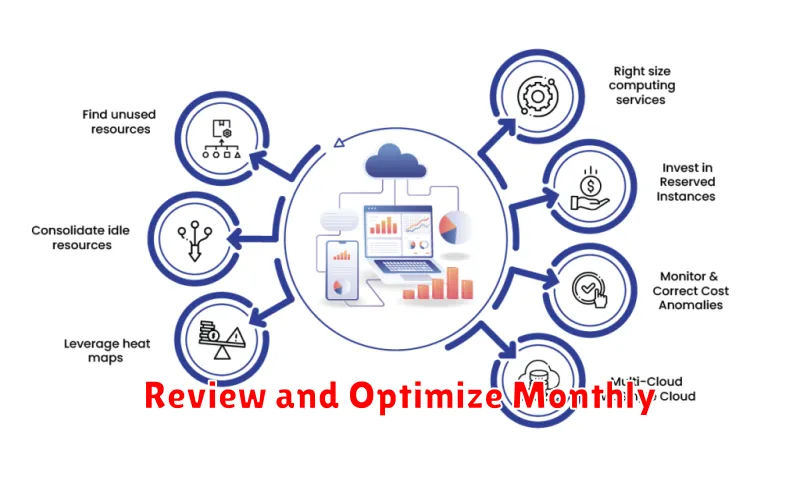
Regular review and optimization are crucial for maintaining cost-efficiency and performance in the cloud. A monthly cadence provides a balance between proactive management and avoiding overly frequent adjustments.
During your monthly review, analyze resource utilization metrics. Identify any underutilized resources, such as virtual machines or databases, and right-size or de-provision them as appropriate. Similarly, address over-utilized resources to prevent performance bottlenecks.
Consider using automated tools to assist with this process. These tools can provide alerts about unusual usage patterns and even automatically adjust resources based on predefined policies. This automated approach can significantly streamline your cloud optimization efforts.
