
In today’s rapidly evolving technological landscape, cloud hosting has become an indispensable component of modern IT infrastructure. Businesses of all sizes rely on the scalability, flexibility, and cost-effectiveness offered by cloud solutions. A key driver of this transformation is the rise of containers, a lightweight and portable virtualization technology that has revolutionized the way applications are deployed and managed in the cloud. Understanding the role of containers in modern cloud hosting is crucial for organizations seeking to optimize their IT operations and achieve a competitive edge in the digital marketplace.
This article delves into the significance of containers in the realm of modern cloud hosting. We will explore how containers enable efficient resource utilization, improve application portability, and facilitate DevOps practices. By examining the benefits and challenges associated with containerization, we aim to provide a comprehensive overview of how this technology is reshaping the cloud hosting landscape. We will also discuss the relationship between containers and other key cloud technologies, such as orchestration platforms and microservices architecture, to provide a holistic perspective on the modern cloud hosting ecosystem.
What Are Containers in Cloud Hosting?
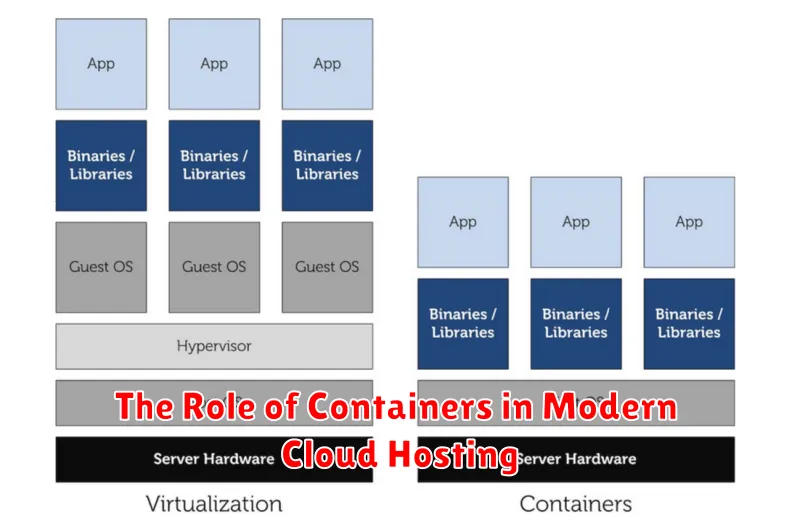
In the context of cloud hosting, containers are lightweight, stand-alone, executable packages of software that include everything needed to run an application: code, runtime, system tools, system libraries, and settings. Unlike virtual machines (VMs), containers share the host operating system’s kernel but maintain isolated user spaces. This makes them significantly more efficient in terms of resource utilization compared to VMs.
Containers offer portability, allowing applications to run consistently across different environments, from a developer’s laptop to a cloud server. This consistency simplifies deployment and reduces compatibility issues. Their isolated nature also enhances security by limiting the impact of vulnerabilities to the contained application, not the entire system.
Containers vs Virtual Machines
Choosing between containers and virtual machines (VMs) often depends on the specific needs of your application. Virtual Machines virtualize the underlying hardware, creating multiple, isolated operating systems. This provides strong isolation but comes with a performance overhead due to the multiple OS instances.
Containers, on the other hand, share the underlying OS kernel. This significantly reduces their size and improves startup times and overall performance. However, this shared kernel means less isolation compared to VMs.
| Feature | Containers | Virtual Machines |
|---|---|---|
| OS | Shared | Individual |
| Size | Smaller | Larger |
| Boot Time | Faster | Slower |
| Isolation | Lower | Higher |
Popular Tools: Docker and Kubernetes
Two prominent tools have become essential in containerization: Docker and Kubernetes. Docker provides the means to package, distribute, and run applications within containers. It simplifies the creation and management of individual containers.
Kubernetes orchestrates the deployment, scaling, and management of these containerized applications across a cluster of machines. It handles tasks such as load balancing, rolling updates, and self-healing, ensuring high availability and efficient resource utilization.
Benefits of Containerization
Containerization offers significant advantages for modern cloud hosting. A primary benefit is increased portability. Containers package applications and their dependencies, allowing them to run consistently across different environments.
Improved resource utilization is another key advantage. Containers share the host operating system kernel, making them lightweight and enabling higher server density compared to virtual machines. This leads to cost savings and enhanced efficiency.
Containers also offer simplified deployment and management. Their consistent packaging simplifies the deployment process and facilitates automation, leading to faster release cycles and improved DevOps practices.
Improved Resource Efficiency
Containers excel at resource utilization. Unlike virtual machines (VMs) that require a full operating system for each instance, containers share the host OS kernel. This significantly reduces the overhead, allowing more containers to run on the same hardware. Consequently, this leads to higher server density and lower infrastructure costs.
This efficiency translates to optimized resource allocation. Resources are only consumed when needed and can be dynamically adjusted. This on-demand scalability contributes to cost savings, especially in cloud environments where billing is often based on resource consumption.
Faster Deployment Cycles
Containers significantly accelerate deployment cycles compared to traditional virtual machines. This speed stems from their lightweight nature and portability. Because containers share the host operating system’s kernel, they avoid the overhead of booting and running a full operating system for each application. This results in faster startup times and reduced resource consumption.
Immutable infrastructure, a key concept often associated with containers, further enhances deployment speed. By packaging all application dependencies within the container image, deployments become predictable and consistent across various environments. This eliminates configuration discrepancies and simplifies rollback procedures, contributing to a more streamlined and efficient deployment process.
Scaling Applications Easily
Containers significantly simplify the process of scaling applications. Scalability is crucial in cloud hosting, allowing applications to handle fluctuating demands. With containers, scaling becomes a matter of replicating container instances. This is far more efficient than traditional methods involving virtual machines.
Horizontal scaling, adding more container instances, is particularly straightforward. Orchestration platforms, like Kubernetes, automate this process, dynamically adjusting the number of running containers based on real-time needs. This ensures optimal resource utilization and application performance under varying loads.
Security Considerations
Container security is a critical aspect of cloud hosting. While containers offer isolation, vulnerabilities in the container image or the underlying host can compromise security. Regularly scanning images for vulnerabilities is crucial.
Limiting container privileges is another important step. Granting only necessary permissions reduces the impact of a potential breach. Additionally, implementing robust network policies controls inter-container communication and limits exposure to external threats.
Real-World Use Cases
Containers are transforming how applications are deployed and managed across various industries. Here are some prominent examples:
Microservices Architecture
Containers are ideal for packaging and deploying individual microservices, allowing for independent scaling and updates without impacting other parts of the application.
DevOps and CI/CD
Containers play a crucial role in streamlining Continuous Integration and Continuous Deployment (CI/CD) pipelines. Their portability ensures consistency across development, testing, and production environments.
Batch Processing
Data processing tasks can be easily containerized and scaled to handle large datasets efficiently. This allows for flexible resource allocation and improved performance.
Getting Started with Containers
Embarking on your container journey begins with understanding the core components. A container image serves as the blueprint, encapsulating your application and its dependencies. A container runtime, such as Docker, is responsible for creating and managing the running containers from these images.
To begin, install a container runtime on your system. Next, acquire or build a container image. Pre-built images for common applications are readily available on repositories like Docker Hub. Custom images can be crafted using a Dockerfile, a script that defines the image’s layers and configurations.
With the image in hand, you can run it using the runtime’s command-line interface. This creates a live instance of your application, isolated within its container. From there, you can manage the container’s lifecycle, including starting, stopping, and deleting it.
